

How to Purchase on ONDC?
Learn how to purchase on ONDC with this complete guide. Step-by-step process, real examples, FAQs, and benefits of ONDC shopping explained in simple English.
India’s digital commerce ecosystem is going through a major shift. The Open Network for Digital Commerce (ONDC) has already crossed 10+ million monthly transactions and onboarded 3+ lakh sellers, with a large share coming from Tier 2 and Tier 3 cities.
Unlike traditional platforms such as Amazon and Flipkart, ONDC is not owned by a single company. It is an open network where:
- Buyers use different apps
- Sellers from multiple platforms compete
- Logistics providers handle delivery
👉 This creates a more open, competitive, and transparent shopping experience
What is ONDC?
ONDC is like a UPI for eCommerce.
Just like UPI allows you to send money between different banks using apps like Paytm, ONDC allows you to buy products from different sellers using different apps.
👉 You are not limited to one platform.
How ONDC Purchase Flow Works
- You open a buyer app (like Magicpin)
- You search for a product
- The app fetches results from multiple sellers
- You choose the best option
- Order is placed
- Logistics partner delivers
Step-by-Step Guide to Purchase on ONDC
Step 1: Choose and Download an ONDC Buyer App
To start shopping, you need a buyer app.
Popular ONDC-enabled apps:
- Paytm
- Magicpin
- Mystore
- Meesho
What to Keep in Mind:
- Different apps may show different sellers
- Prices may vary across apps
- Some apps focus more on food, others on retail
👉 Pro Tip: Always check at least 2 apps before ordering
Step 2: Sign Up and Set Up Your Account
- Enter mobile number and verify OTP
- Add your name
- Add delivery address
- Save multiple addresses (home, office)
👉 This ensures faster checkout later
Step 3: Search for Products
Use simple keywords like:
- “Vegetables near me”
- “Bluetooth earphones”
- “Kurti under ₹1000”
What Happens Behind the Scenes:
- Your query is sent across the ONDC network
- Multiple sellers respond
- Results are shown in one place
👉 This is why ONDC gives wider options
Real-Life Examples
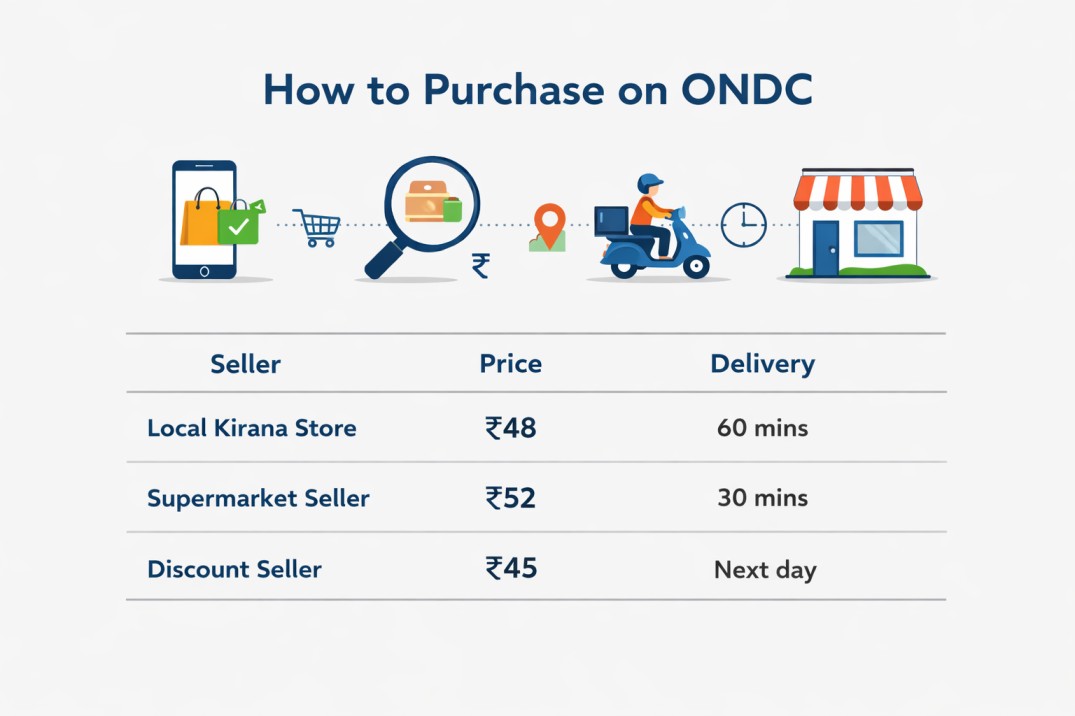
Example 1: Buying Groceries
Next day
👉 Decision depends on:
- Urgency
- Budget
- Trust
Example 2: Ordering Food
Search: “Paneer Butter Masala”
Results may include:
- Nearby restaurant (30 mins delivery)
- Cloud kitchen (cheaper price)
- Premium restaurant (higher price, better rating)
👉 ONDC connects multiple food providers in one place
Example 3: Buying Fashion Item
Search: “Black T-shirt”
Options:
- Local seller: ₹299
- Brand seller: ₹499
- Bulk seller: ₹349
👉 You can balance:
- Price
- Brand value
- Delivery time
Step 4: Compare Before You Buy
This is where ONDC stands out.
Compare:
- Product price
- Delivery charges
- Delivery time
- Seller ratings
👉 Unlike traditional apps, results are less influenced by ads
Step 5: Add to Cart and Checkout
- Select product
- Add to cart
- Choose delivery address
- Proceed to checkout
👉 Some apps may allow multi-seller cart
Step 6: Make Payment
Payment options:
- UPI
- Debit/Credit cards
- Wallets
👉 Apps like Paytm make payments seamless
Step 7: Order Tracking and Delivery
After placing order:
- Track status in app
- Get notifications
- Delivery handled by logistics partners
Status Updates:
- Order confirmed
- Packed
- Out for delivery
- Delivered
Key Benefits of ONDC for Buyers
1. Wider Selection
Access sellers across platforms—not limited to one app
2. Better Price Discovery
- More competition
- Lower commissions
👉 Leads to better deals
3. Reduced Platform Bias
- No single platform control
- More neutral search results
4. Support for Local Sellers
- Kirana stores
- Small businesses
- MSMEs
Challenges / Limitations
- Delivery time may not always be fastest
- Return policies differ by seller
- User experience varies by app
- Not all products available yet
Smart Tips for ONDC Shopping
- ✔ Compare across 2–3 apps
- ✔ Check delivery time before ordering
- ✔ Read seller ratings carefully
- ✔ Start with small orders
- ✔ Prefer sellers with good reviews
Detailed FAQs
1. Is ONDC an app or platform?
ONDC is a network, not an app.
You can use apps like:
- Paytm
- Magicpin
👉 These apps connect you to ONDC.
2. Why are prices different on ONDC?
Prices vary because:
- Different sellers list the same product
- Delivery charges differ
- Sellers compete openly
👉 This creates better price discovery
3. Is ONDC cheaper than Amazon or Flipkart?
Often yes, because:
- Lower platform fees
- No heavy advertising cost
- More seller competition
But:
- Some branded products may have similar pricing
4. Is ONDC safe and government-approved?
Yes. ONDC is backed by the Government of India through the Department for Promotion of Industry and Internal Trade.
5. How are returns and refunds handled?
Returns depend on each seller.
Before buying:
- Check return window
- Check refund method
- Read product description
👉 Always verify before placing order
6. Can I trust new or unknown sellers?
Yes, but follow best practices:
- Check ratings
- Read reviews
- Compare sellers
👉 ONDC gives access to more sellers, so decision-making is important
7. What categories are available on ONDC?
You can buy:
- Groceries
- Food delivery
- Electronics
- Fashion
- Home essentials
👉 Categories are expanding rapidly
8. Which ONDC app should I use?
Try multiple apps:
- Paytm
- DigitalHaat
👉 Choose based on:
- Price
- UI experience
- Availability
Conclusion
ONDC is redefining online shopping in India by creating an open, decentralized, and competitive ecosystem. It gives buyers more power, better pricing options, and access to a wider range of sellers.
With strong government backing and increasing adoption, ONDC is expected to become a core layer of India’s digital commerce infrastructure, just like UPI did for payments.
References:
- ONDC Official Website
- Department for Promotion of Industry and Internal Trade (DPIIT)
- Industry reports on ONDC growth and adoption
- Public data on ONDC monthly transactions and seller base
Related post
.png)
.png)
How Multiple Buyer Apps Access the Same Sellers on ONDC (Network Effect Explained Simply)
.png)
ONDC Buyer App vs Amazon/Flipkart App: What's Actually Different for Shoppers
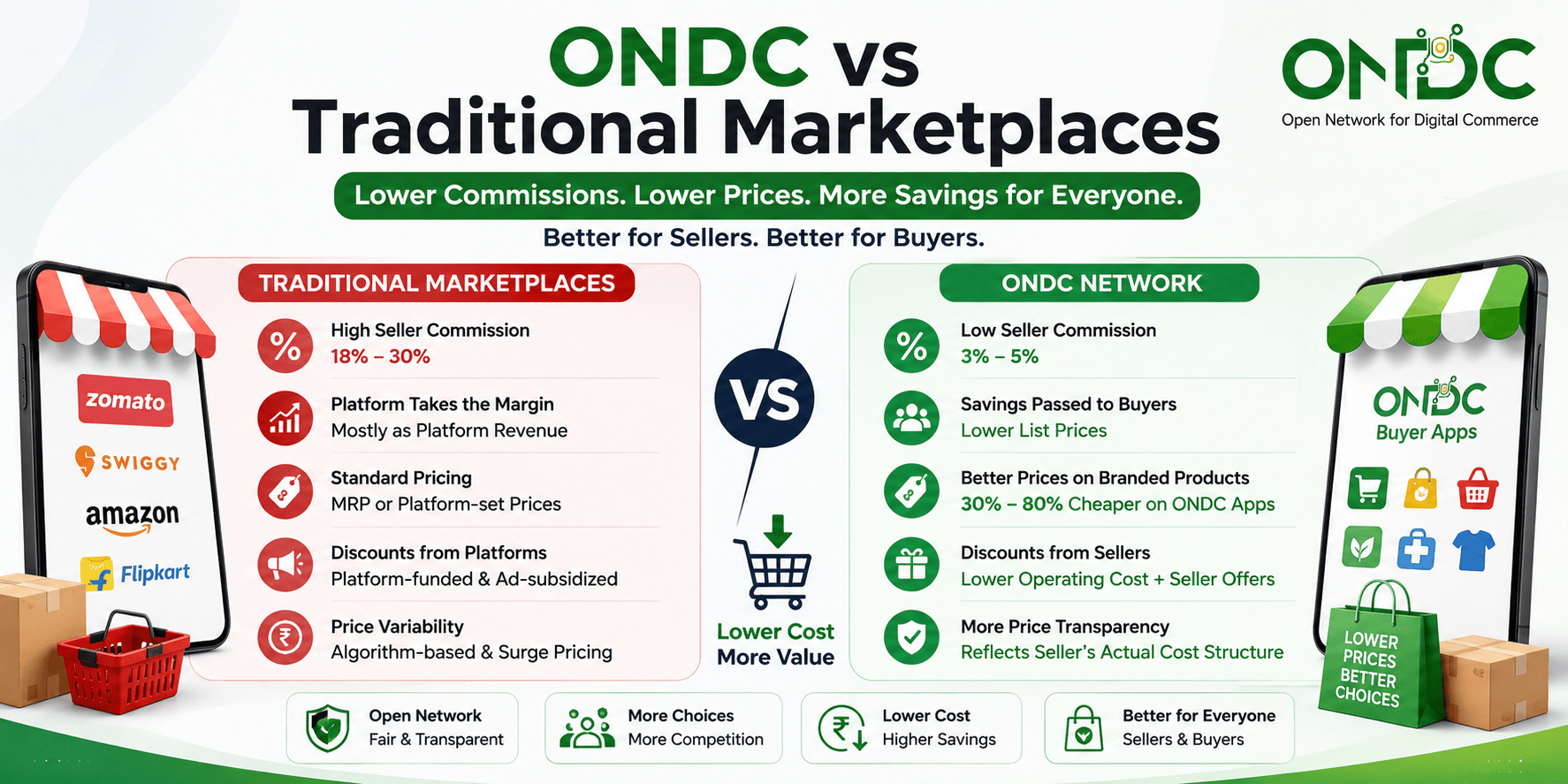
ONDC Discounts & Offers: How Buyers Save More Than on Traditional Marketplaces
Sounds like COSTBO might be the right choice for your business?
Get started by registering your business today! If you have any questions, we're here to help. Our team will reach out to you with detailed information about our offerings, product features, and a demo